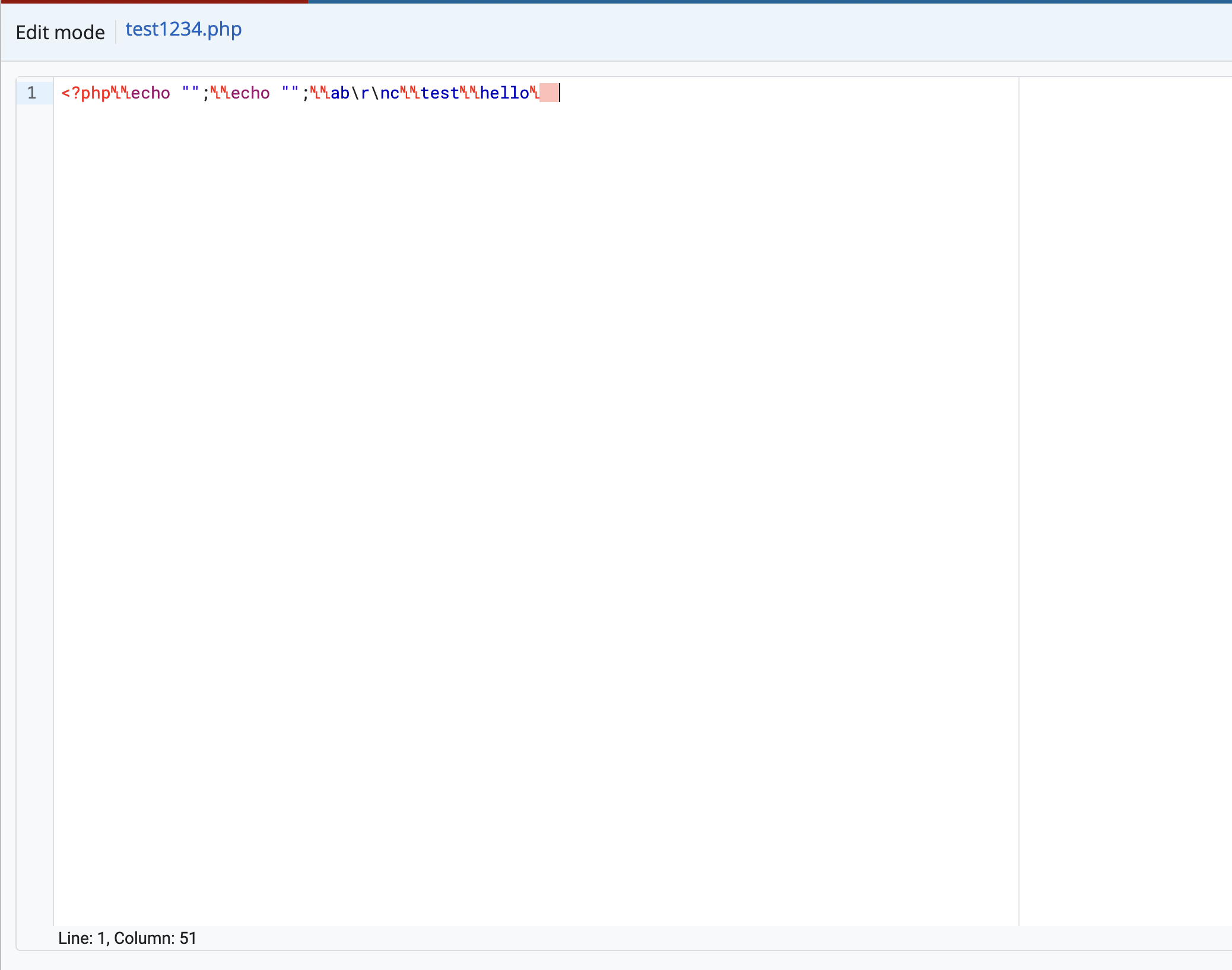
Hi, changing line endings dynamically seems to show weird characters. It resolves if you close the editor and reopen.
https://gerrit-review.googlesource.com/c/plugins/codemirror-editor/+/615582 is my code. I want to fix it so if you paste content containing \r\n then it’ll be that and then \n if it does not have \r\n. And if content is \r\n then it’ll stay like that if you add more code. Vice versa. See image below to see issue. That’s after pasting \n content over \r\n.
          EditorView.updateListener.of(update => {
            // Set ruler width to 72 for commit messages,
            // as this is the recommended line length for git commit messages.
            if (this.fileType?.includes('x-gerrit-commit-message')) {
              updateRulerWidth(72, update.view.defaultCharacterWidth, true);
            } else if (this.prefs?.line_length) {
              // This is required to be in the setTimeout() to ensure the
              // line is set as correctly as possible.
              updateRulerWidth(
                this.prefs.line_length,
                update.view.defaultCharacterWidth,
                true,
              );
            }

            if (update.docChanged) {
              this.dispatchEvent(
                new CustomEvent('content-change', {
                  detail: {value: update.state.sliceDoc()},
                  bubbles: true,
                  composed: true,
                }),
              );
            }
          }),
          EditorView.domEventHandlers({
            keydown(e: KeyboardEvent) {
              // Exempt the ctrl/command+s key from preventing events from propagating
              // through the app. This is because we use it to save changes.
              if (!e.metaKey && !e.ctrlKey) {
                e.stopPropagation();
              }

              // There is an issue where you paste and immediately
              // press ctrl+s/cmd+s after, it would trigger the
              // web browsers file browser rather then gr-editor-view
              // intercepting ctrl+s/cmd+s.
              if ((e.metaKey || e.ctrlKey) && e.key === 'v') {
                e.stopPropagation();
              }
            },
            // If the user pastes CRLF, update the compartment so future serializations use CRLF.
            paste(event: ClipboardEvent, view: EditorView) {
              try {
                const text = event.clipboardData?.getData('text') ?? '';
                const wantsCRLF = text.includes('\r\n');
                const newTerminator = wantsCRLF ? '\r\n' : '\n';

                const currentTerminator =
                  view.state.facet(EditorState.lineSeparator) ?? '\n';

                if (newTerminator !== currentTerminator) {
                  view.dispatch({
                    effects: lineSeparatorCompartment.reconfigure(
                      EditorState.lineSeparator.of(newTerminator),
                    ),
                  });
                }
              } catch {
                // ignore clipboard access errors
              }
            },
          }),