First of all, thank you for the amazing library that is CodeMirror 6!
I’m trying to replicate an editing command that is standard in editors like VSCode: the ability to add a new cursor on the line directly above or below the current one, while preserving the column position.
Following that, I tried to implement this behavior myself. While a basic version is achievable, I quickly ran into numerous edge cases—for instance, how to correctly place the cursor on lines shorter than the current column, or how to behave near folded ranges and at document boundaries. It became clear that a truly robust implementation is not trivial.
This experience is why I believe a native solution would be ideal and leads me to my questions:
Has there been any progress on a native implementation of this command? Is it on the library’s roadmap?
If not, has anyone in the community found an elegant and robust way to implement this, perhaps through a custom extension that handles these subtleties?
Wow, this is fantastic! Thank you so much for implementing this so quickly. I know a feature like this can be quite tricky with all the potential edge cases, so I really appreciate you tackling it. It works perfectly for the most common use cases.
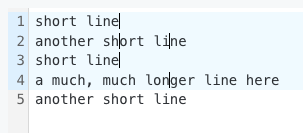
While testing, I came across some edge cases. One of them appears when moving the selection up repeatedly across lines of different lengths.
To reproduce:
Start with text like this:
short line
another short line
short line
a much, much longer line here
another short line
Place the cursor at the middle of longer word.
Press the “Add Cursor Above” keybinding three times.
Actual Behavior: It adds an second cursor on the second line.
Hope this detailed feedback is helpful for refining the patch!
I’d be happy to help out further, whether that’s by testing more edge cases or even trying to contribute a PR for this fix if you can point me in the right direction. Just let me know.
On that note, and purely out of excitement to start using it, do you have a rough idea of when this might land in an official release? No rush, of course.