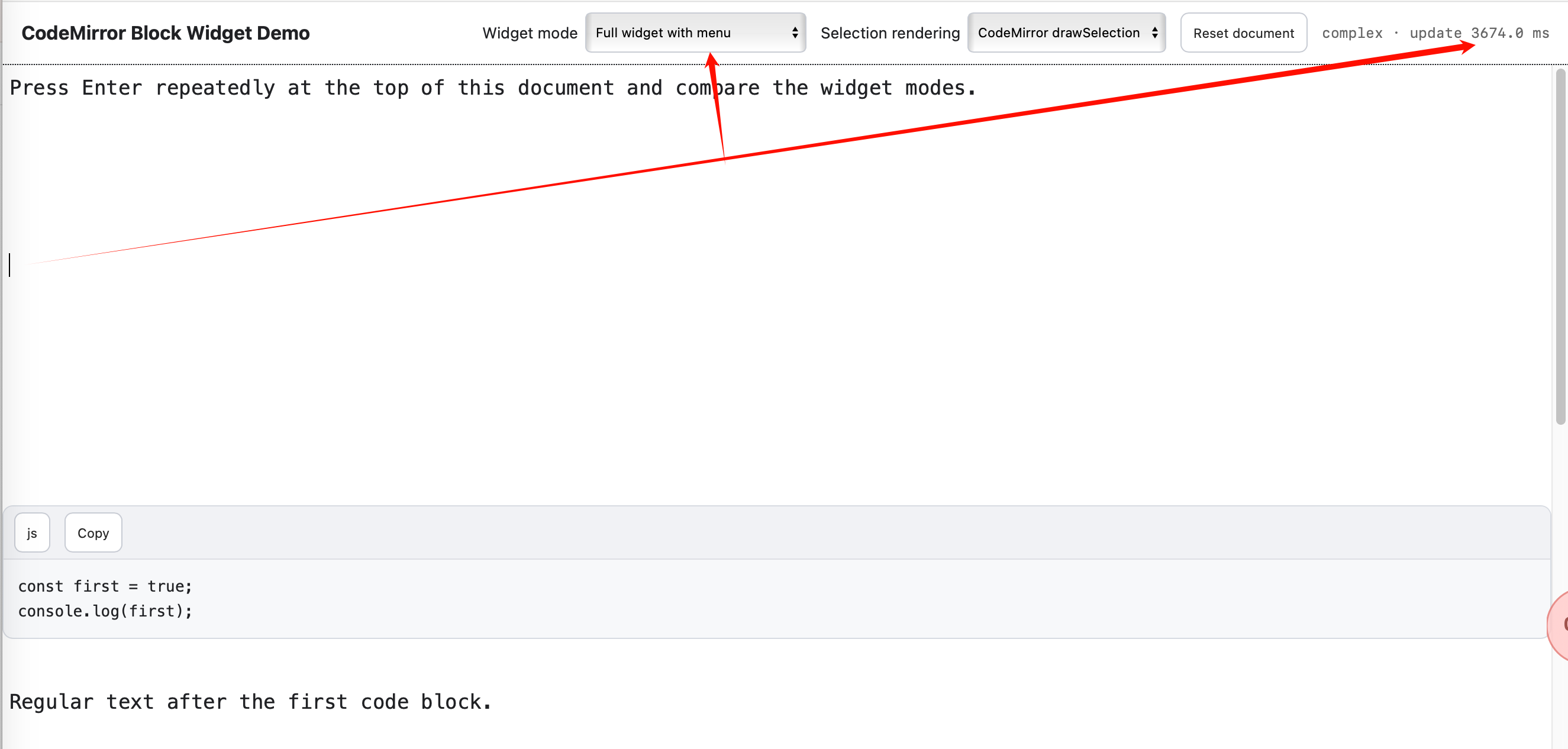
Okay, I’ve made a demo, as follows:
The top-right corner can display the time taken from pressing Enter to the save being completed.
The source code:
import { defaultKeymap, history, historyKeymap } from "@codemirror/commands";
import { markdown } from "@codemirror/lang-markdown";
import { syntaxTree } from "@codemirror/language";
import { Compartment, EditorState, StateField } from "@codemirror/state";
import { Decoration, drawSelection, EditorView, keymap, WidgetType } from "@codemirror/view";
import { GFM } from "@lezer/markdown";

const TEST_DOCUMENT = `Press Enter repeatedly at the top of this document and compare the widget modes.


\`\`\`js
const first = true;
console.log(first);
\`\`\`

Regular text after the first code block.

\`\`\`python
second = 2
print(second)
\`\`\`

Regular text after the second code block.

\`\`\`lua
local third = 3
print(third)
\`\`\`

Regular text after the third code block.

\`\`\`css
.fourth { color: blue; }
\`\`\`

Regular text after the fourth code block.

\`\`\`html
<p>Fifth code block</p>
\`\`\`

Regular text after the fifth code block.

\`\`\`json
{"block": 6}
\`\`\`

Regular text after the sixth code block.

\`\`\`bash
echo "Seventh code block"
\`\`\`

Regular text after the seventh code block.

\`\`\`typescript
const eighth: number = 8;
\`\`\`

End of document.
`;

const modeCompartment = new Compartment();
const selectionCompartment = new Compartment();
const status = document.querySelector("#status");
const modeSelect = document.querySelector("#mode");
const selectionModeSelect = document.querySelector("#selectionMode");
const sharedToolbar = document.querySelector("#sharedToolbar");
const sharedLanguage = document.querySelector("#sharedLanguage");
const sharedCopy = document.querySelector("#sharedCopy");
const sharedLanguageMenu = document.querySelector("#sharedLanguageMenu");
let lastInputAt = 0;
let activeSharedBlock = null;
const LANGUAGE_NAMES = ["TEXT", "JAVASCRIPT", "TYPESCRIPT", "JSON", "LUA", "HTML", "CSS", "PYTHON", "SHELL", "SQL", "MERMAID", "SVG"];

for (const name of LANGUAGE_NAMES) {
  const option = sharedLanguageMenu.appendChild(document.createElement("button"));
  option.type = "button";
  option.textContent = name;
  option.addEventListener("click", () => {
    sharedLanguage.textContent = name;
    sharedLanguageMenu.style.display = "none";
  });
}

function hideSharedToolbar() {
  sharedToolbar.classList.remove("is-visible");
  sharedLanguageMenu.style.display = "none";
  activeSharedBlock = null;
}

function positionSharedToolbar(block) {
  if (!block?.isConnected || modeSelect.value !== "shared") return hideSharedToolbar();
  activeSharedBlock = block;
  const rect = block.getBoundingClientRect();
  sharedLanguage.textContent = block.dataset.language || "TEXT";
  sharedToolbar.classList.add("is-visible");
  const width = sharedToolbar.offsetWidth;
  sharedToolbar.style.left = `${Math.max(8, rect.right - width - 8)}px`;
  sharedToolbar.style.top = `${Math.max(8, rect.top + 5)}px`;
}

class SimpleCodeWidget extends WidgetType {
  constructor(source) { super(); this.source = source; }
  eq(other) { return other.source === this.source; }
  toDOM() {
    const pre = document.createElement("pre");
    pre.className = "simple-code";
    pre.textContent = this.source;
    return pre;
  }
}

class ComplexCodeWidget extends WidgetType {
  constructor(source, language, variant) {
    super();
    this.source = source;
    this.language = language;
    this.variant = variant;
  }
  eq(other) { return other.source === this.source && other.language === this.language && other.variant === this.variant; }
  toDOM() {
    const shell = document.createElement("div");
    shell.className = "demo-code-shell";
    const section = shell.appendChild(document.createElement("section"));
    section.className = "demo-code";
    const header = section.appendChild(document.createElement("header"));
    const staticHeader = this.variant === "static" || this.variant === "shared";
    const language = header.appendChild(document.createElement(staticHeader ? "span" : "button"));
    language.textContent = this.language || "TEXT";
    let menu = null;
    if (!staticHeader) {
      language.type = "button";
      const copy = header.appendChild(document.createElement("button"));
      copy.type = "button";
      copy.textContent = "Copy";
      copy.addEventListener("click", () => navigator.clipboard?.writeText(this.source));
    }
    if (this.variant === "complex") {
      menu = document.body.appendChild(document.createElement("div"));
      menu.className = "demo-menu";
      for (const name of LANGUAGE_NAMES) {
        const option = menu.appendChild(document.createElement("button"));
        option.type = "button";
        option.textContent = name;
        option.addEventListener("mousedown", (event) => event.preventDefault());
      }
      language.addEventListener("click", () => {
        const rect = language.getBoundingClientRect();
        menu.style.left = `${rect.left}px`;
        menu.style.top = `${rect.bottom + 5}px`;
        menu.style.display = menu.style.display === "block" ? "none" : "block";
      });
    }
    const pre = section.appendChild(document.createElement("pre"));
    const code = pre.appendChild(document.createElement("code"));
    code.textContent = this.source;
    if (this.variant === "shared") {
      section.dataset.language = this.language || "TEXT";
      section.dataset.source = this.source;
      section.addEventListener("mouseenter", () => positionSharedToolbar(section));
      section.addEventListener("mousedown", () => positionSharedToolbar(section));
    }
    shell._cleanup = () => menu?.remove();
    return shell;
  }
  destroy(dom) { dom._cleanup?.(); }
}

function codeDecorations(state, variant) {
  const ranges = [];
  syntaxTree(state).iterate({
    enter(node) {
      if (node.name !== "FencedCode") return;
      const first = state.doc.lineAt(node.from);
      const last = state.doc.lineAt(Math.max(node.from, node.to - 1));
      if (state.selection.ranges.some((range) => range.from >= node.from && range.to <= node.to)) return false;
      const from = first.to < node.to ? first.to + 1 : first.to;
      const to = last.from > from ? last.from - 1 : from;
      const source = state.doc.sliceString(from, to);
      const language = first.text.replace(/^\s*`{3,}/, "").trim();
      ranges.push(Decoration.replace({
        widget: variant === "simple" ? new SimpleCodeWidget(source) : new ComplexCodeWidget(source, language, variant),
        block: true,
      }).range(node.from, node.to));
      return false;
    },
  });
  return Decoration.set(ranges, true);
}

function codeBlocks(variant) {
  return StateField.define({
    create(state) { return codeDecorations(state, variant); },
    update(value, transaction) {
      if (!transaction.docChanged && !transaction.selection) return value;
      return codeDecorations(transaction.state, variant);
    },
    provide: (field) => [
      EditorView.decorations.from(field),
      EditorView.atomicRanges.of((view) => view.state.field(field)),
    ],
  });
}

function modeExtension(mode) {
  if (["complex", "buttons", "shared", "static", "simple"].includes(mode)) return codeBlocks(mode);
  return [];
}

const nativeSelectionTheme = EditorView.theme({
  "& .cm-selectionLayer": { display: "none !important" },
});

function selectionExtension(mode) {
  return mode === "native" ? nativeSelectionTheme : drawSelection();
}

const editor = new EditorView({
  parent: document.querySelector("#editor"),
  state: EditorState.create({
    doc: TEST_DOCUMENT,
    extensions: [
      history(),
      markdown({ extensions: [GFM] }),
      EditorView.lineWrapping,
      modeCompartment.of(modeExtension("complex")),
      selectionCompartment.of(selectionExtension("draw")),
      EditorView.updateListener.of((update) => {
        if (!update.docChanged) return;
        const now = performance.now();
        const elapsed = lastInputAt ? now - lastInputAt : 0;
        status.textContent = `${modeSelect.value} · update ${elapsed.toFixed(1)} ms`;
        lastInputAt = now;
      }),
      keymap.of([...defaultKeymap, ...historyKeymap]),
    ],
  }),
});

modeSelect.addEventListener("change", () => {
  hideSharedToolbar();
  editor.dispatch({ effects: modeCompartment.reconfigure(modeExtension(modeSelect.value)) });
  editor.focus();
});

sharedLanguage.addEventListener("click", () => {
  if (!activeSharedBlock) return;
  const rect = sharedLanguage.getBoundingClientRect();
  sharedLanguageMenu.style.left = `${rect.left}px`;
  sharedLanguageMenu.style.top = `${rect.bottom + 5}px`;
  sharedLanguageMenu.style.display = sharedLanguageMenu.style.display === "block" ? "none" : "block";
});

sharedCopy.addEventListener("click", () => {
  if (activeSharedBlock) navigator.clipboard?.writeText(activeSharedBlock.dataset.source || "");
});

window.addEventListener("resize", () => activeSharedBlock && positionSharedToolbar(activeSharedBlock));
editor.scrollDOM.addEventListener("scroll", () => activeSharedBlock && positionSharedToolbar(activeSharedBlock), { passive: true });

selectionModeSelect.addEventListener("change", () => {
  editor.dispatch({ effects: selectionCompartment.reconfigure(selectionExtension(selectionModeSelect.value)) });
  editor.focus();
});

document.querySelector("#reset").addEventListener("click", () => {
  editor.dispatch({ changes: { from: 0, to: editor.state.doc.length, insert: TEST_DOCUMENT } });
  editor.focus();
});

window.demoEditor = editor;
demo.html (500.5 KB)